Automatically Publish Blog Posts on WordPress with Meta Title and Meta Description
Anyone who wants to automatically publish blog posts on WordPress usually also cares how those posts look in search results. The tool described here handles both. Besides title and body, it can send a separate meta title and meta description along with each article, so that the search listing is written by you and not guessed by a plugin. It is designed for site owners who publish on a schedule but still want every post to carry proper search details from the start.

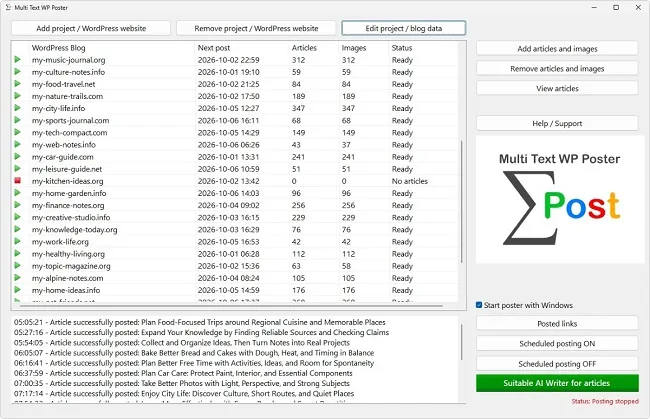
The post is online, the text is good, the image sits well. And yet the search engine later shows a title nobody chose, and beneath it some snippet from the middle of the article. That happens when meta title and meta description are missing. When you automatically publish blog posts on WordPress, both details can be stored right in the article so that they reach the site together with the post. What is needed for that and what matters when wording them is clarified in this article.
What Meta Details Do
The meta title is the blue headline that appears in search results. The meta description is the text beneath it. Together they form the business card of your post, and they decide whether someone clicks. Both are separate from the post title on the site, because in the search result you have far less room and a different goal: there the text has to convince, while on the site it may be more detailed.
If no custom details are stored, the SEO plugin falls back on templates, usually the post title and an automatically formed excerpt. That is better than nothing, but rarely optimal. The excerpt may end mid-sentence or contain an introduction that is unsuitable as advertising copy for the post. Your own wording gives you control back.
One limitation is worth knowing when you automatically publish blog posts on WordPress: search engines are not obliged to adopt your details. Google sometimes rewrites titles and descriptions when another text fits the search query better. The meta description is also not a direct ranking factor. Its value lies in the click-through rate, that is, in more of the people who see your post in the results actually opening it. If you automatically publish blog posts on WordPress and send usable details with every post, you ensure a consistently high standard.
How the Details Appear in the Article File
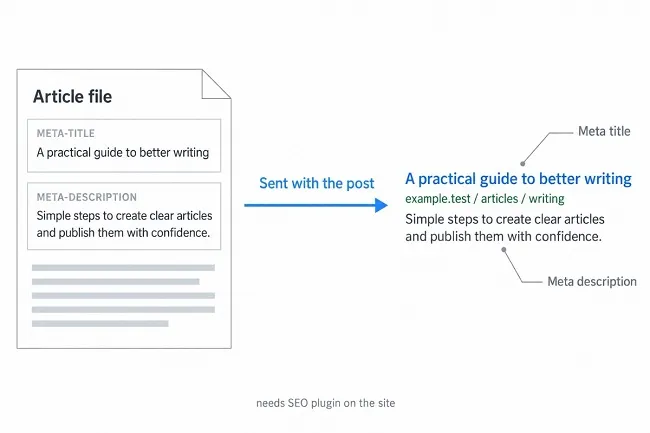
To automatically publish blog posts on WordPress with SEO details, the article format has two sections: META-TITLE and META-DESCRIPTION. Both are optional, and you can use just one of them. Each section takes exactly one line. If more follows below, the program evaluates only the first non-empty line. Write the description in one piece and without a line break.
An example of how a file is structured: first comes the marker [TITLE] with the headline, then [META-TITLE] with the title for search engines, then [META-DESCRIPTION] with the description, and last [TEXT] with the article. The order of the optional sections among themselves does not matter. If both meta sections are empty or missing entirely, the program skips the transfer, and nothing further happens.
When you automatically publish blog posts on WordPress and at least one of the two sections has content, the program assumes you want SEO details and checks after posting whether they arrived. That way you do not depend on your own eye for the check. If something does not work, you find out in the log, as the section after next shows.
What Has to Be Installed on the Site
To automatically publish blog posts on WordPress with meta details, note that WordPress has no fields for meta title and meta description of its own. They come from SEO extensions. Multi Text WP Poster works with the Rank Math plugin for this. In addition there is an extension plugin from the maker called "Multi Text WP Poster SEO Plugin". The two warning messages the program can output suggest that you need both building blocks: one complains about the maker's plugin, the other about Rank Math.
To automatically publish blog posts on WordPress with SEO data, install both in the WordPress backend under "Plugins" via "Add New". You find Rank Math through the search; the maker's plugin you obtain through the maker's instructions. Activate both and run through the short setup in Rank Math. After that the site is ready to take over meta details from the articles. The setup for those who automatically publish blog posts on WordPress is a one-time job per site, so once per blog if you have several.
If you already use another SEO plugin and want to automatically publish blog posts on WordPress, check whether it gets along with Rank Math, because two plugins filling the same fields easily get in each other's way. When in doubt, stay with one of the two. The warning messages name Rank Math explicitly. Judging by these messages, other SEO plugins are not filled. Make a backup before switching if the site already holds many posts with details maintained in another plugin.
Reading the SEO Warning in the Log Correctly
If a building block is missing while you automatically publish blog posts on WordPress, the post is published anyway. That is an important property: missing SEO details do not stop the automaton. Instead the program appends a warning to the success message. In the first variant it says that the maker's SEO plugin is not installed and that no SEO title or meta description can be posted. In the second variant it is Rank Math that was not found.
Both warnings mean the same when you automatically publish blog posts on WordPress: the post is online, but without your meta details. In that case check first whether both plugins are installed and active. Once that is fixed, the details apply to all articles that appear afterwards. Posts that are already published without meta details you have to add once by hand in the editor, because the program does not transfer anything retroactively.
That is why it pays, when you automatically publish blog posts on WordPress, to look closely at the very first post. Publish a test article with meta details, look at the log and then open the post in the editor. In the SEO plugin's area, title and description should stand exactly as you wrote them into the file. Only when that is right do you fill up the stock, otherwise you will later be adding dozens of posts by hand.
Maintaining Meta Details When You Automatically Publish Blog Posts on WordPress
For single posts you write meta details on the side. To automatically publish blog posts on WordPress from a stock of fifty articles, you need a system. The easiest way is to set the details when creating the text, while topic and core message are fresh. Have an AI assistant make suggestions if you like, and store them as sections in the file. Never adopt the suggestions blindly: check whether they fit the text and whether they keep to the lengths.
For checking lengths in a stock that you automatically publish blog posts on WordPress from, a text editor that counts characters is enough, or a small spreadsheet with a counting function. Paste titles and descriptions of all articles into one column, sort them and look for duplicate beginnings. Several descriptions that start with the same opening sentence look monotonous in the results and can be varied with a few changes.
Update the details when you revise an article in content. If the meta title no longer matches the new focus, it raises expectations the text does not meet. And finally: anyone who looks at the search statistics after a few weeks can tell from the click-through rate of individual posts which wordings work. A post with many impressions but few clicks is a good candidate for a new title.
Writing the Meta Title
When you automatically publish blog posts on WordPress, the meta title should name the topic clearly and contain the most important search term as early as possible. A guideline is about 60 characters. Longer titles are often cut off in the results, which is especially unfortunate when the most important part is at the end. Every title must be unique on the site. Two posts with the same meta title make things needlessly hard for search engines and readers.
| Feature | Recommendation |
|---|
| Length | around 50 to 60 characters |
| Most important search term | preferably at the beginning |
| Uniqueness | a separate title per post |
| Promise | must be delivered by the text |
| Brand name | only append if room remains |
When you automatically publish blog posts on WordPress, avoid exaggerations such as "The ultimate guide" or capitalization for emphasis. Anyone who promises a lot and delivers little is quickly punished by readers, and they do not come back. A factual, concrete title such as "Balcony planting: plants for sun and shade" usually works better.
Writing the Meta Description
When you automatically publish blog posts on WordPress, you have roughly 140 to 160 characters for the description. Use them for one or two short, complete sentences that say what awaits the reader and why opening the post is worthwhile. Do not simply repeat the title but complement it: name a concrete benefit, a number or a result. The search term may appear but does not need to be used several times, because it is highlighted in the display anyway when it matches the search query.
Even if you automatically publish blog posts on WordPress, write for people, not for machines. A sentence like "Find out which five plants on a south-facing balcony will not scorch even in August" is more attractive than a list of search terms. Avoid quotation marks and special characters that could be cut off in the display, and make sure every description sounds different. With twenty texts that start the same way, the overall impression of your site suffers.
Finally, whenever you automatically publish blog posts on WordPress, check whether the promise is kept in the post. Anyone who promises something in the search result and finds something else on the site leaves immediately. That costs trust and in the long run affects visibility.
|



