AI Background Blur No Subscription No Account Easy to Use
One click on the subject and the background melts into soft blur.
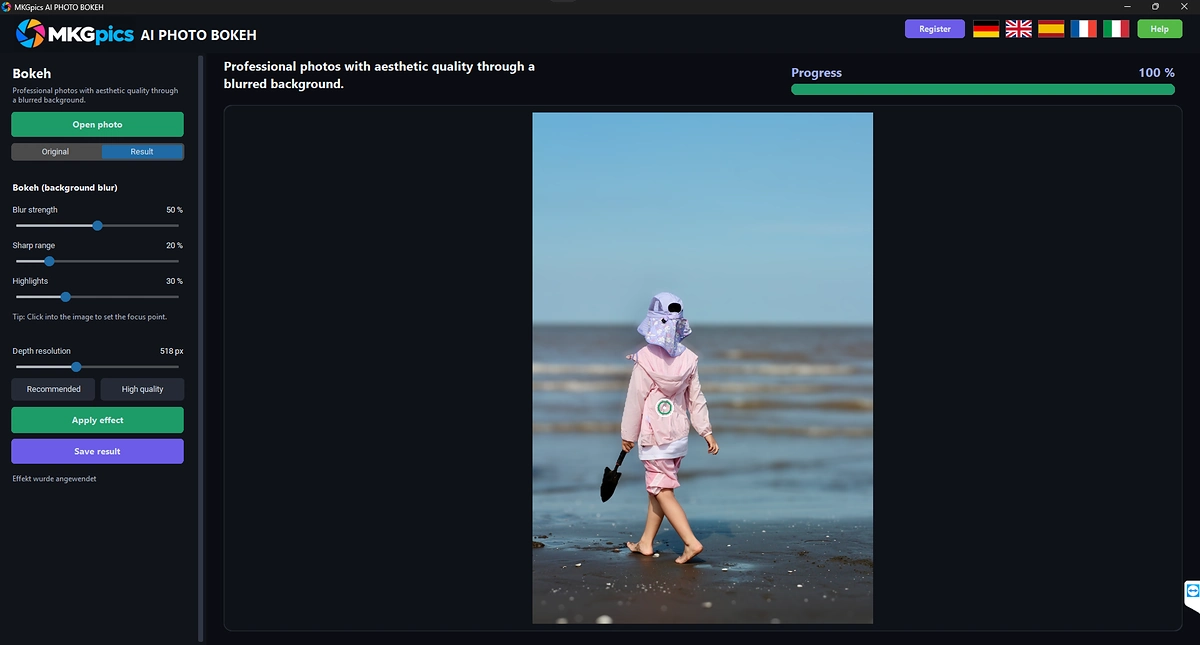
MKGpics AI PHOTO BOKEH is an AI program for the PC. The photo is opened, the focus point is clicked, and the AI turns the background into soft blur around the sharp subject. The blur runs without cloud and without subscription.

The AI background blur works on ordinary photos and needs no special camera or portrait mode. The AI bokeh effect shows original and result in two views, so the look is judged before saving.
Functions of the AI Background Blur Program
- Open photo dialog for PNG, JPG, JPEG, WebP and BMP files
- Focus point set with a click into the photo
- Hint text that guides the click
- AI depth map that separates near and far areas
- Blur strength control from soft to strong
- Sharp range control for the zone around the focus point
- Highlights control that enlarges bright light spots
- Round light discs on bright highlights
- Depth resolution control with a Recommended button
- High quality button for finer depth detail
- Apply effect button
- Status messages for the depth step and the blur step
- Progress display during the calculation
- Preview with Original and Result views
- Save result as PNG or as JPG
- Result names with the suffix _bokeh
- Protection against overwriting the original
- Help page plus five interface languages
- Local Python AI libraries estimate the depth on the PC
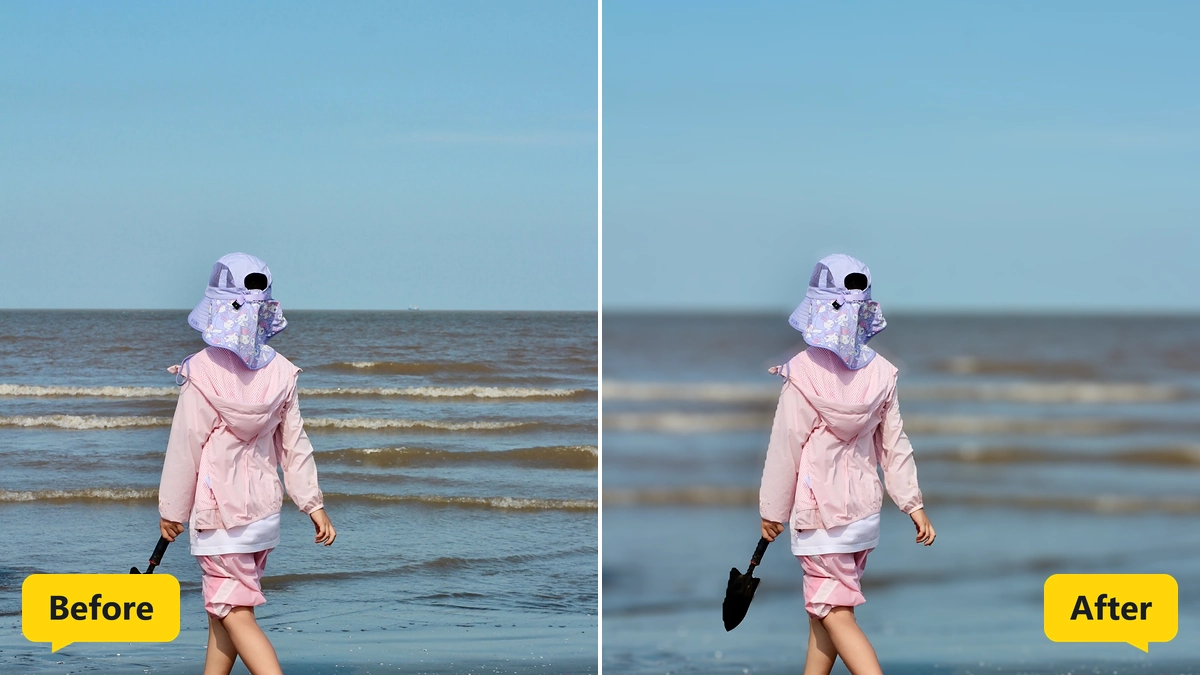
Applying the AI Bokeh Effect from Open to Save
The first step is Open photo, which lists PNG, JPG, JPEG, WebP and BMP files in a file dialog. The photo appears in the preview, and a hint asks for a click on the focus point.
The click sets the sharp spot for the AI bokeh effect, for example a face or a product. Everything at a similar distance stays sharp, and everything further away drops into blur.
Three controls shape the look. Blur strength decides how soft the background becomes, sharp range decides how large the crisp zone around the focus point is, and highlights decides how strongly bright light spots grow into round discs.
» Free download and background blur for your photos
A click on Apply effect starts the calculation. Status messages name the steps, first the depth map and then the blur, and a progress display follows.
At the end, Save result writes a PNG or a JPG with the suffix _bokeh. The original is protected, so saving over it is refused.
How AI Background Blur Reads Depth in a Photo
Normal photos carry no distance data. The AI estimates a depth map from the image, which marks every area as near or far, and the blur follows this map.
Blur grows with the distance from the focus point, so objects close to the subject stay crisp while the far background softens more. This gradual change looks like a real lens and not like a flat blur layer.
Depth resolution sets the fineness of the depth map. The Recommended button restores the balanced start, and the High quality button follows thin edges such as hair and branches more closely, with a longer calculation time.
Bright highlights in the background grow into round light discs when the highlights control is raised. Night scenes with street lights or fairy lights show the familiar bokeh look, and the AI bokeh effect therefore reacts to the light in the photo.
Who Uses an AI Bokeh Effect
Phones and compact cameras have small sensors and show little natural blur. The AI bokeh effect adds that look afterwards.
- Beginners who want a portrait look after one click
- Phone photographers with small sensors
- Hobby photographers who missed the right aperture
- Online sellers with product photos
- Professionals who polish images for clients
- Designers who need calm backgrounds for text overlays
Jobs for AI Background Blur from Portraits to Products
Portraits get a calm backdrop, pets stand out from busy gardens, and food shots get the shallow depth of a close-up lens. Travel photos with crowded backgrounds turn into clean subject pictures.
» AI Background Blur free download
Product photos for shops work well too, since a soft backdrop removes distractions and puts the item first. The AI background blur keeps the product sharp and blurs the rest.
Photos with a clear subject suit the AI bokeh effect best. Flat scenes without distance, such as a wall photographed straight on, show little difference, because the depth map has nothing to separate.
Questions and Answers about Background Blur
How do I blur the background of a photo with AI?
Open the photo, click the focus point and press Apply effect. The AI calculates a depth map and blurs everything behind the subject.
What is the bokeh effect?
Bokeh is the soft blur and the round light discs in out-of-focus areas, known from lenses with a wide aperture. The program creates this look with AI.
Does the blur look natural?
The blur grows with the distance from the focus point, and bright highlights turn into round discs, so the result resembles a real lens.
How do I keep more of the photo sharp?
Raise the sharp range, and the zone around the focus point stays crisp over a wider area. Lower blur strength gives a gentler background.
Which image formats work?
Photos in PNG, JPG, JPEG, WebP and BMP format open in the program, and results are saved as PNG or JPG.
Does it work offline?
Yes, the blur calculation runs on the local PC and needs no internet connection.
|



