AI Sky Replacer Easy to Use
Dull gray skies turn into dramatic evening skies with one click on a sky image.
MKGpics AI PHOTO SKY REPLACER is an AI program for the PC. Open a landscape photo, click a sky image, and the AI finds the sky and swaps it for the new one. The sky is fine tuned afterwards, and the result is saved as PNG, JPG or WebP, without cloud and without subscription.

The AI sky replacer works on landscapes, city views and holiday snaps with a plain or overcast sky. Brightness, color and position of the new sky stay adjustable after the swap, so the AI sky replacement result matches the scene.
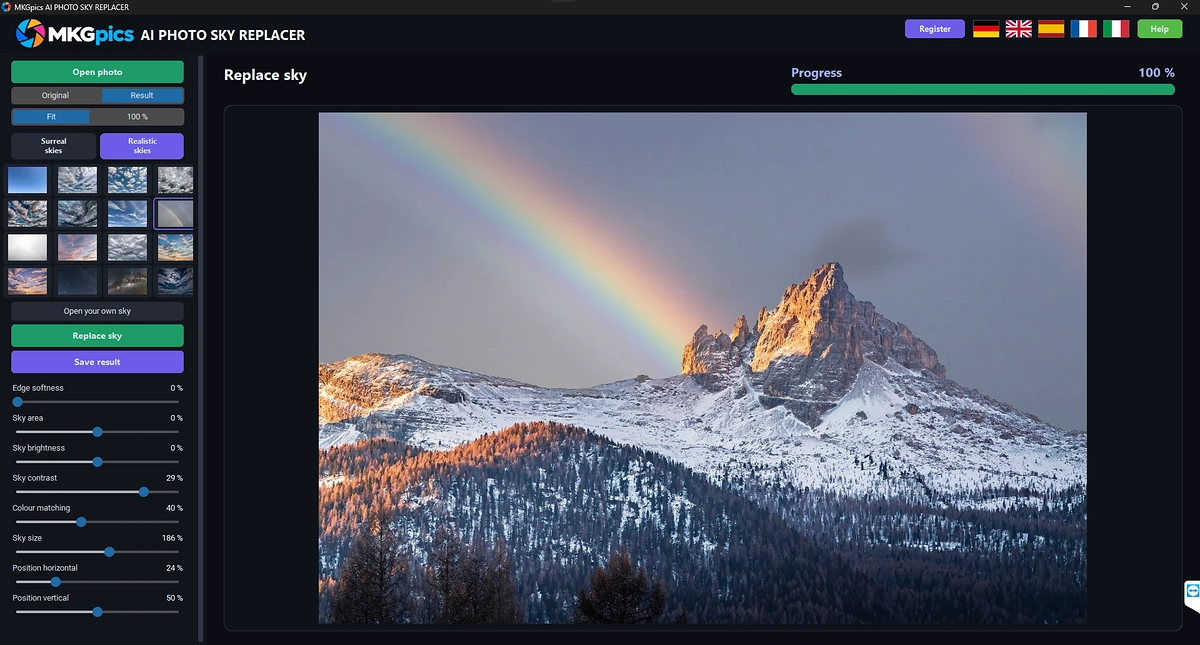
Functions of the AI Sky Replacer Program
- Open dialog for PNG, JPG, JPEG, WebP and BMP photos
- Library of sky images shown as small preview pictures
- Two sets of skies, one surreal and one realistic
- Own sky pictures opened from the PC
- Crop window to pick the wanted part of a sky picture
- Option to keep the aspect ratio of the photo while cropping
- Replace sky button that starts the AI
- Automatic detection of the sky area in the photo
- Notice when the photo contains no sky
- Edge softness for the transition between sky and landscape
- Sky area adjustment for the border of the replaced region
- Brightness and contrast for the new sky
- Color matching that blends the sky into the scene
- Sky size and position adjustable horizontally and vertically
- Original and Result views for before and after
- Progress bar and status text during the work
- Save result as PNG, JPG or WebP
- Result names with the suffix _sky
- Protection against overwriting the original photo
- Help page plus five interface languages
- Local Python AI libraries detect the sky on the PC

Swapping a Dull Sky Step by Step with AI Sky Replacement
The photo comes in through Open photo, and the dialog lists PNG, JPG, JPEG, WebP and BMP files. The sky images appear as small thumbnails, grouped into surreal and realistic skies.
A personal sky picture joins through Open your own sky. The crop window lets you drag a frame over the part you want, resize it by the corners and keep the aspect ratio of the photo.
» Free download and sky swap for your photos
Then Replace sky starts the AI. The status text names the stages of loading, detecting and inserting the new sky, and a progress bar fills meanwhile.
Afterwards a hint asks for fine tuning of brightness, color, contrast and sky position. The preview updates at once, so the AI sky replacer result is judged before saving.
The result is saved as PNG, JPG or WebP with the suffix _sky. Saving over the original is refused.
What Makes AI Sky Replacement Look Natural
Realistic skies fit most photos, because their light and clouds match everyday scenes. Surreal skies suit creative edits and posters.
Good AI sky replacement starts with a sky whose light direction matches the photo. Low evening sun in the sky and noon shadows on the ground reveal the swap.
Color matching pulls the tones of the new sky toward the landscape, and brightness and contrast refine the mood. Edge softness hides the line along trees, roofs and mountains.
Photos without any visible sky get a notice instead of a result, because the AI finds nothing to replace.
Thin branches and wires are delicate zones, so check them in the preview before saving.
How the AI Sky Replacer Finds and Fills the Sky
The AI studies the photo and marks which pixels belong to the sky. Everything else, such as buildings, trees and water, stays untouched.
The new sky is placed behind the marked area, scaled to fit and blended along the border. Size and position decide which part of the sky picture shows.
No manual masking with a brush is needed, and the border follows the skyline.
Library skies and own pictures go through the same steps, so a personal cloud photo works like a ready made one.
Jobs for AI Sky Replacement from Landscapes to Listings
Overcast holiday photos get a blue sky with clouds, and the AI sky replacer lifts the whole mood of the picture.
» AI Sky Replacer free download
Real estate photos with a dull sky look brighter, and outdoor wedding or event pictures get a dramatic evening backdrop.
Photographers use sunsets and storm skies for creative edits, and a few clicks are enough. Designers pair surreal skies with posters and covers.
Questions and Answers about Changing a Photo Sky
How do I replace the sky in a photo with AI?
Open the photo, click a sky image and click Replace sky. Fine tune brightness, color and position, then save the result.
Does the program accept my own sky pictures?
Yes, Open your own sky adds a picture from the PC. The crop window picks the wanted part before the swap.
How do I make a replaced sky look natural?
Choose a sky with matching light, use color matching and edge softness, and adjust brightness and contrast in the preview.
Which file formats work?
The program opens PNG, JPG, JPEG, WebP and BMP photos and saves PNG, JPG or WebP.
What happens when a photo has no sky?
The program shows a notice that no sky was detected, and the photo stays as it is.
Does it work offline?
Yes, the sky detection and swap run on the local PC and need no internet connection.
|
|



