Bulk Background Remover AI No Subscription Free Download Easy to Use
Whole folders of photos lose their backgrounds in one run, saved as transparent PNG or JPG with color.
MKGpics AI BATCH PHOTO BACKGROUND REMOVER runs as an AI program on the PC. Photos are added to a list, a profile and an output format are chosen, and one click on Start batch cuts out every image. The program works without cloud and without subscription.

The bulk background remover AI saves the hours that manual cutting takes. With an AI batch background remover the same choices apply to the whole list, and every result lands in the output folder.
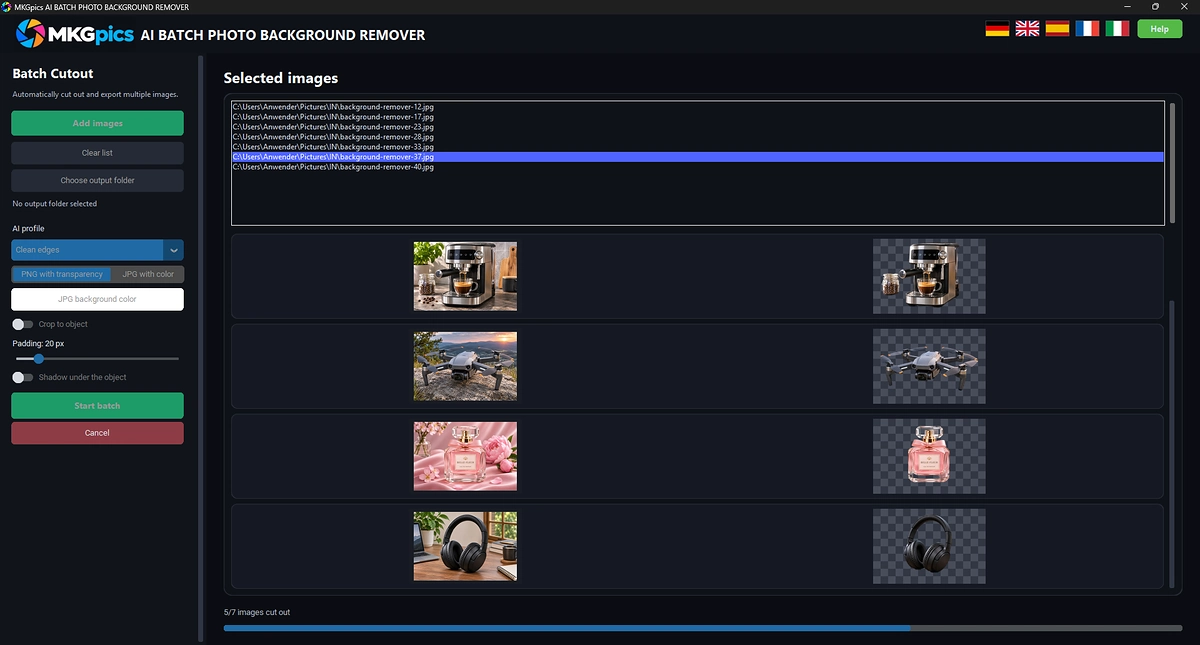
Functions of Bulk Background Remover AI
- Add images from a file dialog or open a whole folder after a confirmation
- Image formats PNG, JPG, JPEG, WebP and BMP
- List of the selected images with thumbnails
- Counter that names how many images are selected
- Clear list button for a fresh start
- Preview of the original next to the cutout
- Three AI profiles named Standard, Fine details and Clean edges
- Short hint under each profile
- Switch to crop the result to the object
- Adjustable padding around the cropped object
- Output as PNG with transparency
- Output as JPG with a background color of your choice
- Color picker for the JPG background
- Choice of the output folder and a button to open it
- Protection against using the original folder as output
- Start batch and Cancel buttons
- Progress counter such as 12/40 images cut out
- Summary with saved images and a list of errors
- File names with the suffix _cutout
- Help and interface in five languages
- Python AI libraries on the local PC do the cutting

AI Batch Background Remover from Load to Save
Photos enter through Add images, and a whole folder is loaded after one confirmation. The list shows a thumbnail for every photo, and the counter names how many images are selected. The bulk background remover AI works through exactly this list.
Next comes the AI profile. Standard covers ordinary subjects, Fine details is made for hair, fur and thin structures, and Clean edges fits products and sharply defined objects.
» Free download and cutting of whole photo folders
The output format is PNG with transparency or JPG with a background color from the color dialog. Crop to object trims the canvas around the subject, and the padding keeps a margin of the chosen size.
Once Start batch is clicked, the AI batch background remover reports progress as a count of finished images. Stopping with Cancel ends the run after the current image, and the finished images stay saved.
Every file gets the original name plus _cutout. At the end of the run, a message lists the saved images and any errors, and one button opens the output folder. The original folder is refused as a target, so the originals stay untouched.
How the AI Cuts Out Every Photo in the Folder
After the click, the AI looks at each image, finds the main subject and removes the background around it. Soft areas such as hair and fur get a fine edge, so no hard outline remains.
The bulk background remover AI repeats this for every entry in the list, from the first thumbnail to the last. Each result is saved at once, so a long run produces files while it is still going.
Fine details brings out hair and fur, and Clean edges sharpens the outline of boxes, bottles and furniture. The AI batch background remover with the right profile saves a second pass.
Who Needs Bulk Background Remover AI Cutouts
Shop owners, photographers and agencies face the same task: many images and one look. The AI batch background remover turns that task into a single run.
- Beginners who want cutouts without learning an editor
- Hobby photographers with large vacation collections
- Online sellers preparing product photos for shops
- Professionals who deliver cutouts to clients on deadline
- Designers who need transparent PNG files for layouts
- Agencies that prepare catalog images in volume
Jobs That an AI Batch Background Remover Finishes in One Run
Product photos for marketplaces need white or transparent backgrounds, and an AI batch background remover prepares a full catalog in one pass. JPG with a white background fits marketplaces that reject transparency.
» Bulk Background Remover AI free download
Portraits for team pages, ID style photos and event pictures share one background after a single run. Fine details protects the hair.
Crop to object plus padding gives every product the same margin, so a grid of thumbnails looks even. The AI batch background remover removes the manual alignment.
Questions and Answers about Bulk Background Removal
How do I remove the background from many photos at once?
Add the images or a whole folder, choose a profile and an output format, pick an output folder and click Start batch. The AI cuts out every image in the list.
Which profile is best for hair and fur?
Fine details is made for hair, fur and thin structures. Standard fits most subjects, and Clean edges fits products with sharp outlines.
Does the result keep a transparent background?
Yes, PNG with transparency keeps the cutout transparent. JPG with color fills the background with a color from the color dialog.
Which file formats does the program load?
PNG, JPG, JPEG, WebP and BMP files load into the list, and results are saved as PNG or JPG.
Where do the finished cutouts go?
Into the chosen output folder, named after the original plus _cutout. One button opens the folder after the run.
Does the background removal work offline?
Yes, the whole run happens on the local PC, and no internet connection is needed.
|



