AI Photo Upscaling No Internet Upload
Small photos grow to twice or four times the width and height with fine detail added.
MKGpics AI PHOTO UPSCALER is an AI program for the PC. Open a small photo, pick 2× or 4× and click Enlarge, and the AI adds fine detail while the picture grows. The result is saved as PNG, JPG or WebP, without cloud and without subscription.

The AI photo upscaling program works on small web pictures, old digital camera photos and cropped details. Detail strength stays adjustable after the run, so the AI photo upscaler result is tuned between smooth and rich in texture.
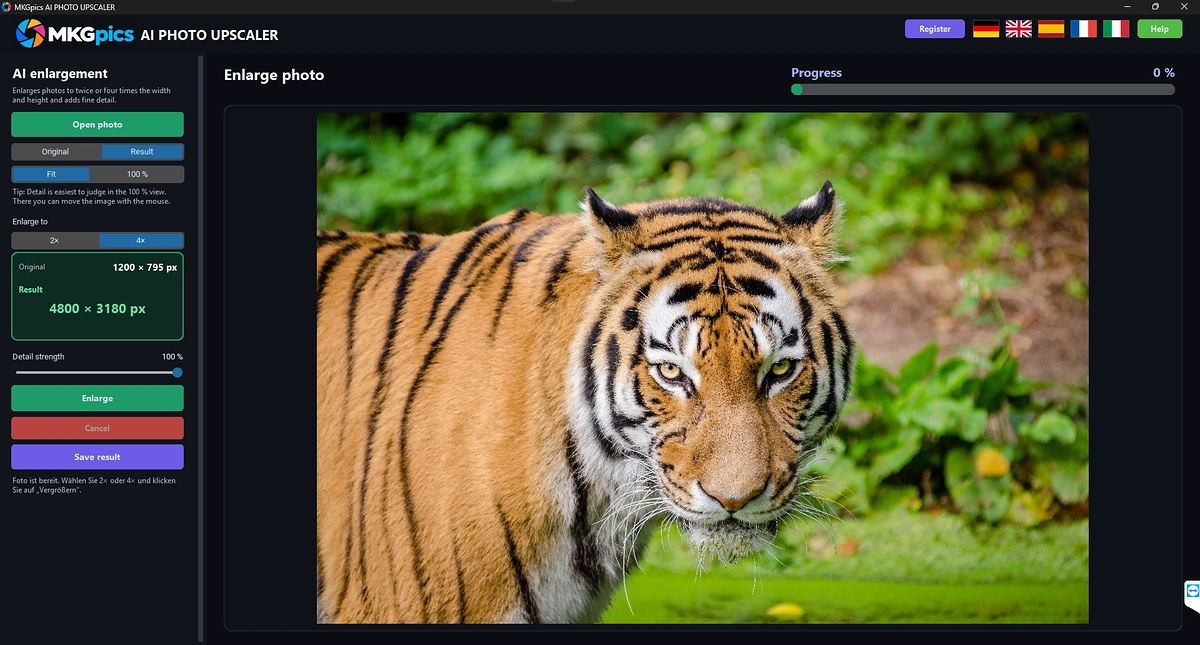
Functions of the AI Photo Upscaling Program
- Photo picker for PNG, JPG, JPEG, WebP and BMP files
- Size choice of 2× or 4× for width and height
- Enlarge button that starts the AI
- Detail strength adjustable after the run with instant preview
- Notice that asks for a new click when the size choice changes
- Original and Result buttons to compare before and after
- Fit view for the whole picture
- Original size view for judging detail
- Mouse dragging inside the original size view
- Hint text that explains where detail is best judged
- Progress bar plus status text that counts completed sections
- Cancel button for a running job
- Sections with overlap keep large photos free of visible seams
- Status line that names the finished pixel size
- Output limit for extremely large results with a clear notice
- Export as PNG, JPG or WebP
- Result names with the suffix _upscaled
- Original photo stays untouched because overwriting is blocked
- Help page plus five interface languages
- Local Python AI libraries enlarge the photo on the PC
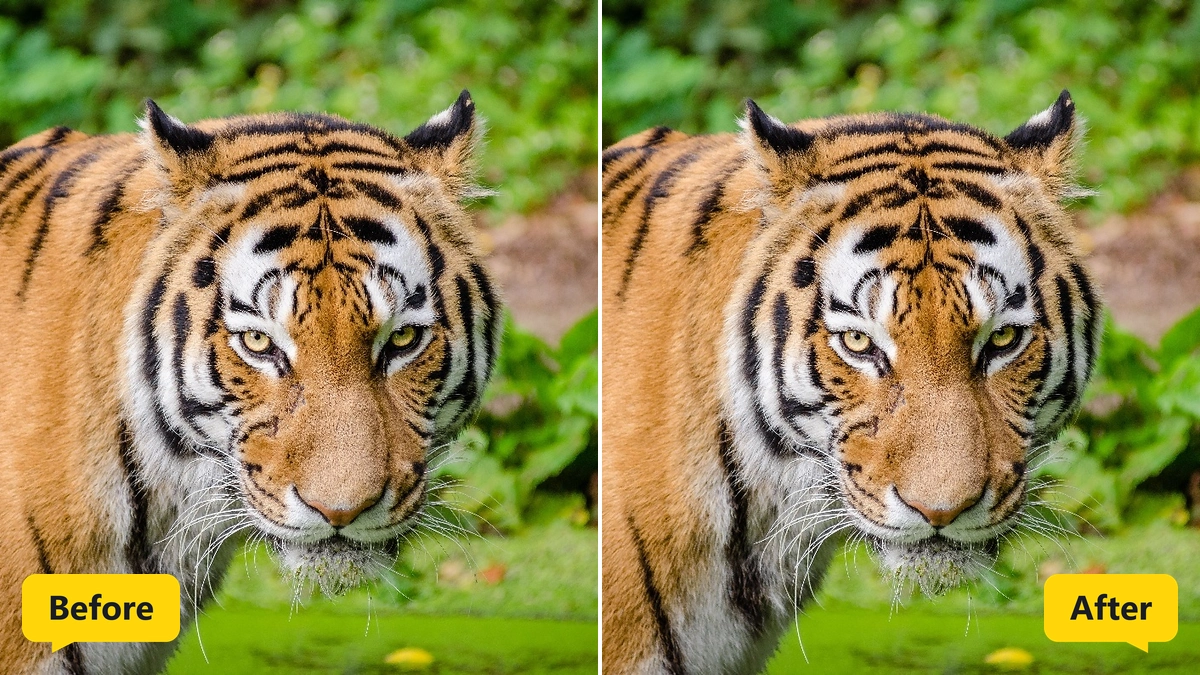
Enlarging a Photo in Four Steps with AI Photo Upscaler Controls
The picker behind Open photo lists PNG, JPG, JPEG, WebP and BMP files. After loading, the status line asks to choose 2× or 4× and click Enlarge.
After the click on Enlarge, the AI starts. The status text counts finished sections, a progress bar fills, and Cancel stops the job whenever needed.
» Free download and bigger pictures for your photos
2× doubles the width and height, and 4× quadruples them. Changing the size after a run needs a fresh click on Enlarge, and the status line says so.
Detail strength decides how much AI detail enters the picture, and the preview follows at once without a second run. Original and Result views show the difference, and the Original size view with mouse dragging shows the pixels one to one.
The enlarged photo is saved as PNG, JPG or WebP with the suffix _upscaled. Saving over the original is refused.
How AI Photo Upscaling Adds Fine Detail to Small Pictures
The AI studies edges, textures and shapes and creates fine detail where a plain stretch would only produce soft pixels. Classic resizing spreads existing pixels, while the AI builds new ones.
Big photos are processed in overlapping sections, and the status text counts the finished ones. The overlap hides seams, so the enlarged picture reads as one piece.
The AI photo upscaling result grows in width and height by the chosen factor. Extremely large results are capped, and the status line reports the final size in pixels.
The AI photo upscaler works best on photos with clear structure. Heavily compressed pictures with visible blocks grow too, but some of the blocks remain.
Who Uses the AI Photo Upscaler Program
Small pictures turn up in every collection. The AI photo upscaler program grows them for print and big screens.
- Beginners who want bigger photos without editing skills
- Photographers who crop deep and need resolution back
- Web editors who restore small pictures from old pages
- Print shops and designers who prepare images for posters
- Archivists who enlarge old scans and thumbnails
- Online sellers who enlarge small product photos
Jobs for AI Photo Upscaling from Prints to Web Images
Old digital camera photos and phone snaps reach printable size, and AI photo upscaling keeps edges crisp.
» AI Photo Upscaling free download
Cropped details such as a face or a bird in the distance grow to a usable size.
Small web images and product photos reach the size that shop pages and presentations demand.
Questions and Answers about Enlarging Photos
How do I upscale a photo with AI?
Open the photo, choose 2× or 4×, click Enlarge and save the result.
Does upscaling really add detail?
The AI builds fine detail from the structure of the picture. Detail strength sets how much of it enters the photo, and the preview shows the effect at once.
What is the difference between 2× and 4×?
2× gives twice the width and height, and 4× gives four times the width and height.
Which file formats work?
Photos in PNG, JPG, JPEG, WebP and BMP open, and the enlarged result goes out as PNG, JPG or WebP.
How do I judge the sharpness of an enlarged photo?
Switch to the Original size view. The picture is shown pixel for pixel and moves with the mouse.
Does it work offline?
Yes, the AI enlarges the picture on the local PC, so no internet connection is involved.
|



