AI Image Noise Reduction No Cloud No Internet Upload
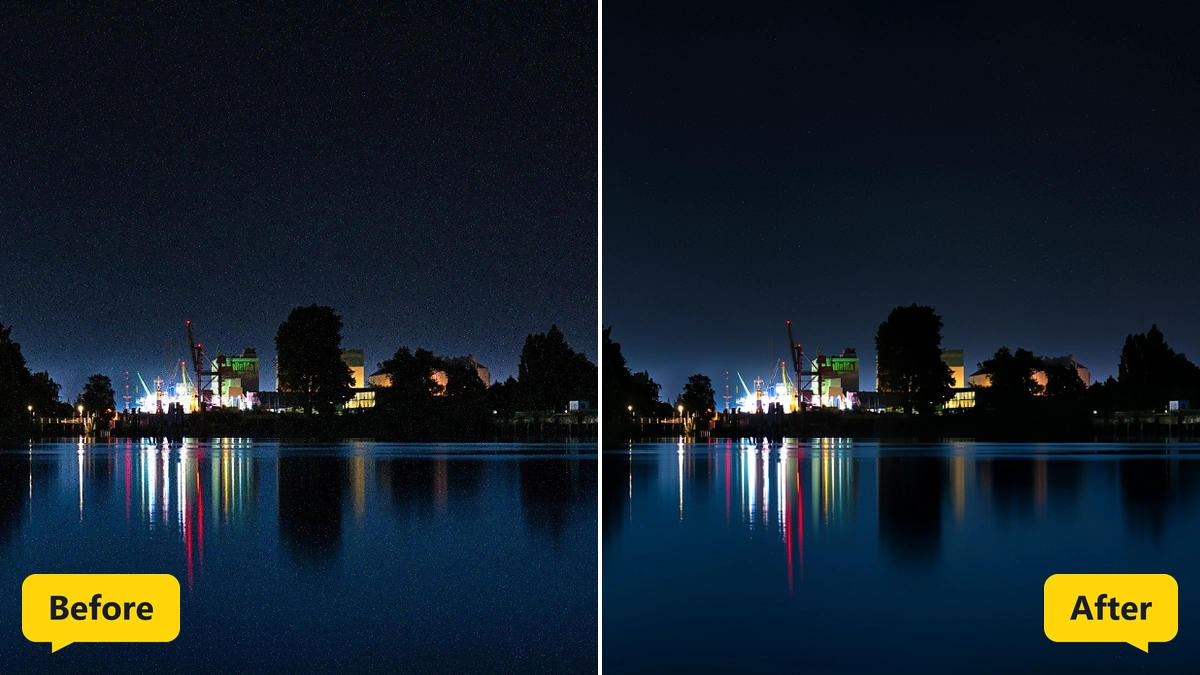
Grain and color noise melt away while fine detail stays.
MKGpics AI PHOTO DENOISER is an AI program for the PC. Open a noisy photo, click Reduce noise, and the AI cleans grain and color speckles from the image. The cleaned photo is saved as PNG or JPG, without cloud and without subscription.

The AI image noise reduction in this program works on night shots, high ISO photos and dark indoor pictures. The strength stays adjustable after the run, so the AI photo denoiser result is tuned between texture and smoothness.
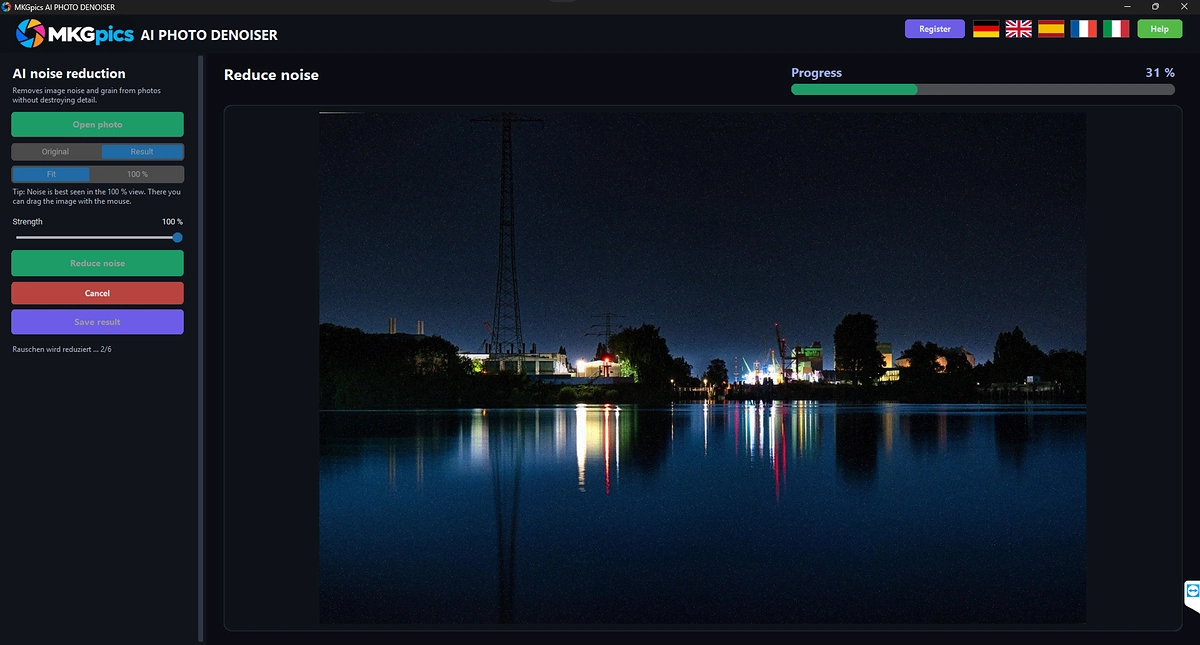
Functions of the AI Image Noise Reduction Program
- Photo dialog that accepts PNG, JPG, JPEG, WebP and BMP images
- Reduce noise button that starts the AI
- Strength control for the balance between texture and smoothness
- Strength stays adjustable after the run with instant preview
- Preview switch between Original and Result
- Fit view for the whole photo
- Original size view for judging grain
- Mouse dragging to move the image in the original size view
- Hint text that explains where noise is best seen
- Status text that counts finished sections
- Progress bar during the calculation
- Cancel button for a running job
- Large photos processed in overlapping sections
- Save result as PNG or as JPG
- Result names with the suffix _denoised
- Guard that blocks saving over the original photo
- Help page plus five interface languages
- Local Python AI libraries remove the noise on the PC
Removing Grain with the AI Photo Denoiser Step by Step
Images in PNG, JPG, JPEG, WebP and BMP format load through Open photo. After loading, the status line asks for a click on Reduce noise.
Next comes Reduce noise, which starts the AI. The status text counts finished sections, a progress bar fills, and Cancel stops the job at any moment.
» Free download and noise cleanup for your photos
Strength decides how much of the cleaned result enters the photo. The full setting shows the pure AI result, and lower settings mix in more of the original texture. The change shows up in the preview at once, and no second run is needed.
The Fit view shows the whole photo, and the Original size view shows the pixels one to one. Dragging with the mouse moves the image there, because grain is easiest to judge at that size.
The cleaned file goes out as PNG or JPG with the suffix _denoised. Saving over the original is refused.
What Decides Detail and Smoothness in AI Image Noise Reduction
Noise and fine texture look alike, so every noise reduction trades some detail for smoothness. High strength gives clean sky and skin, while lower strength keeps hair, fabric and stone surfaces more lively.
Dark photos with heavy grain improve the most. Sharp photos with light noise need only a gentle touch, and the preview shows the difference between Original and Result.
The AI photo denoiser keeps edges and structure and removes the random speckle on top. Heavily blurred photos stay blurred, because denoising reduces noise and does not add sharpness.
Photographers Cleaning Grainy Shots
Phones and cameras at high sensitivity produce grain in dim light. The AI photo denoiser removes it afterwards.
- Beginners who want smooth photos without editing skills
- Phone photographers who shoot in dim rooms
- Event photographers with high sensitivity series
- Astro and night hobbyists with long exposures
- Professionals who hand over polished images to clients
- Archivists who rescue grainy scans
Jobs for AI Image Noise Reduction from Night Shots to Scans
Concert photos, night cityscapes and dim indoor events need high sensitivity and show grain. The AI photo denoiser cleans each picture after the event.
» AI Image Noise Reduction free download
Old scans, low light smartphone photos and dusk drone shots need the same cleanup.
Product photos from a small studio get smooth backgrounds, which helps later steps such as cutting out or enlarging. AI image noise reduction therefore belongs at the start of an editing chain.
Questions and Answers about Photo Noise
How do I remove noise from a photo with AI?
Open the photo and click Reduce noise. The AI cleans the image, and the Original and Result views show the difference before saving.
Does noise reduction remove detail?
Some fine texture always disappears with noise. Lower strength keeps more of it, and the strength stays adjustable after the run.
What is the difference between grain and noise?
Noise is random speckle from high sensitivity or dark scenes, and grain is the film variant of it. The AI treats both as unwanted texture.
Which file formats work?
The program opens PNG, JPG, JPEG, WebP and BMP photos and saves the result as PNG or JPG.
How do I see noise in a photo?
Switch to the Original size view. There the image is shown pixel for pixel and moves with the mouse, so grain is easy to spot.
Does it work offline?
Yes, the noise reduction runs on the local PC and needs no internet connection.
|



