AI Photo Colorizer Easy to Use
Black and white photos get natural colors in one click.
MKGpics AI PHOTO COLORIZER is an AI program for the PC. Open a black and white or faded photo, click once, and the colorized result is saved as PNG or JPG. Everything is done on the PC without cloud, and no subscription is involved.

The AI photo colorizer adds plausible colors to skin, sky, plants and fabric while brightness and fine detail of the original stay in place. One click is all it takes to AI colorize black and white photos, and two views show original and result for a quick check.
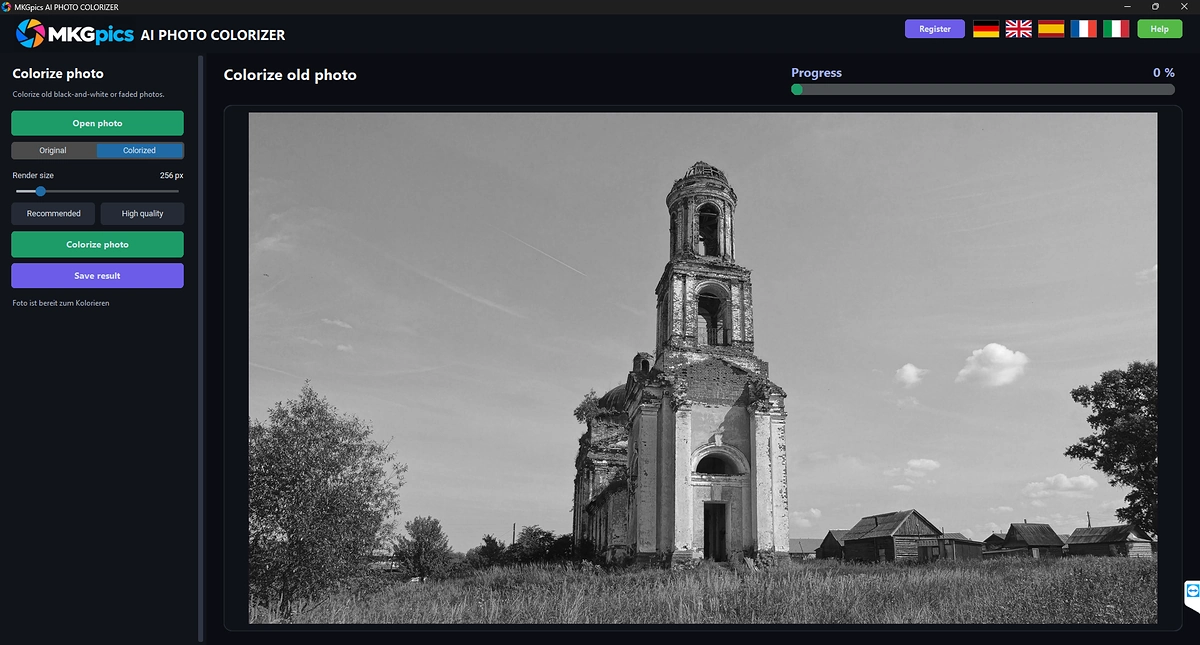
Functions of the AI Photo Colorizer Program
- Open photo dialog that lists PNG, JPG, JPEG, WebP and BMP images
- Colorize photo button that starts the AI
- Preview switch between Original and Colorized
- Quality control named render size
- Recommended button for the balanced start
- High quality button for finer color areas
- Status text during the calculation
- Progress bar with a running count
- Colors for common areas such as skin, sky, plants and fabric
- Brightness and fine detail of the original stay untouched
- Works with black and white scans and faded photos
- Save result as PNG or as JPG
- Result names with the suffix _colorized
- Guard against saving over the source file
- Help page plus five interface languages
- Local Python AI libraries predict the colors on the PC

AI Colorize Black and White Photos in Four Steps
The photo is loaded through Open photo, and the dialog lists PNG, JPG, JPEG, WebP and BMP images. The picture appears in the preview, and the status line reports that the photo is ready for colorization.
Render size sets the quality of the colorization. Recommended is the balanced start, and High quality works with finer color areas and takes longer.
» Free download and colorizing of old prints
A click on Colorize photo starts the AI. The progress bar fills while a status text reports that the photo is being colorized. Afterwards a switch toggles between Original and Colorized, so every change is checked at once.
The colorized copy is written as PNG or JPG with the suffix _colorized. The original is protected, because saving over it is refused. The source scan therefore stays untouched.
What Shapes the Colors in AI Photo Colorizer Results
During colorization the AI guesses colors from the content, so the result is a plausible version and not a historical record. Skin tones, blue sky and green grass come out convincingly, while unusual clothing or objects receive a likely but not a known color.
Sharp, well exposed scans work best. Heavily faded or blurry photos still receive color, but fine areas such as lace or small signs stay less defined.
High quality gives smoother color transitions in large areas such as sky or walls. The Recommended choice is enough for a first look.
Brightness and structure always come from the original, so the photo keeps its grain and contrast.
How AI Colorize Black and White Photos Works
The step from black and white to color needs knowledge about content, because a black and white photo holds only brightness. The AI recognizes faces, plants, sky and objects, and each recognized area receives a fitting color.
The colors are laid over the full resolution original, so a large scan keeps all its pixels.
Jobs for the AI Photo Colorizer from Albums to Archives
Portraits of grandparents, school photos and holiday pictures from past decades get color. Colorize old photos for a gift, a photo book or a family tree page, and the faces look familiar again.
» AI Photo Colorizer free download
Local history groups, museums and archives use AI to colorize black and white photos of documents and street scenes for exhibitions and websites.
Teachers and authors use colorized material to make history lessons vivid. Faded color prints regain natural colors with a photo colorizer as well.
Questions and Answers about Photo Colorizing
How do I colorize a black and white photo with AI?
Open the photo, choose Recommended or High quality and click Colorize photo to AI colorize black and white photos. The AI adds colors, and the Colorized view shows the result before saving.
Are the colors accurate?
The AI picks plausible colors from the content, such as blue sky and natural skin tones. Black and white photos record no real colors, so some objects receive a likely guess.
Does it work with faded photos?
Yes, black and white scans and faded photos both work, and sharp scans give the best colors.
What is the difference between Recommended and High quality?
Recommended is the balanced start. High quality works with finer color areas and takes longer.
Which image formats work?
The file dialog opens PNG, JPG, JPEG, WebP and BMP photos, and the colorized copy is written as PNG or JPG.
Does it work offline?
Yes, the colorization runs on the local PC and needs no internet connection.
|
|



