Sharpen Blurry Images AI No Internet Upload Easy to Use
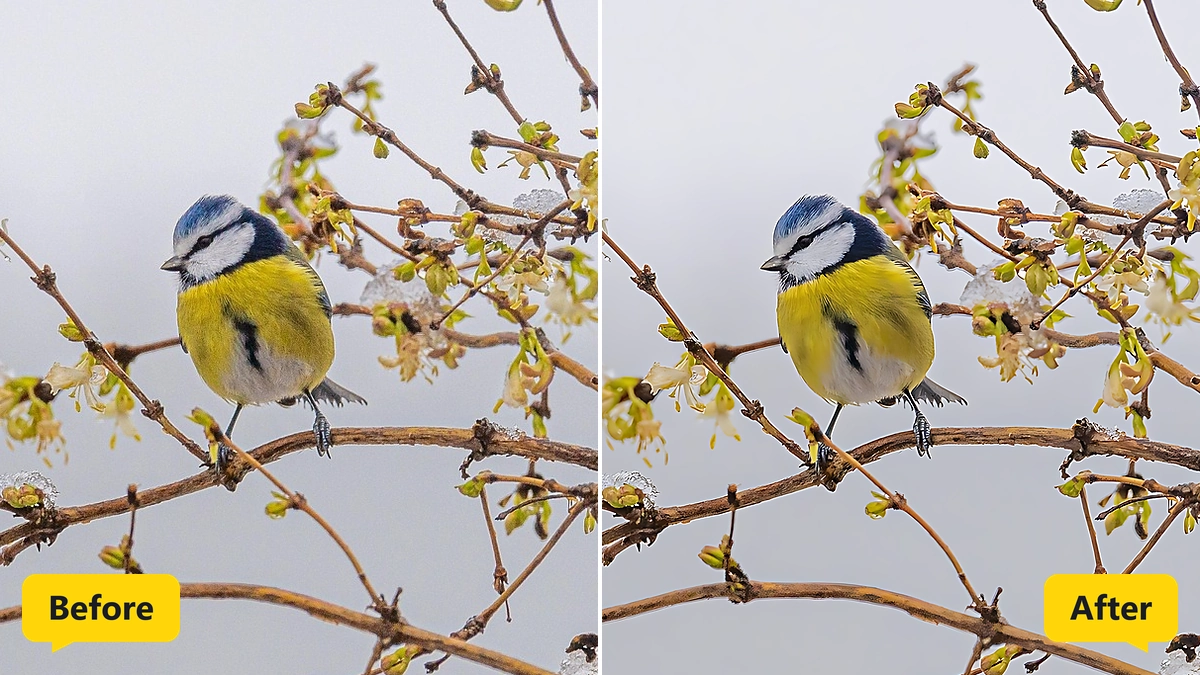
Blurred photos regain crisp edges and fine detail after one click.
MKGpics AI PHOTO SHARPENER is an AI program for the PC. Open a soft photo and click Make sharper, and the AI restores fine detail and crisp edges. The photo keeps its size, and the result is saved as PNG, JPG or WebP, without cloud and without subscription.

The sharpen blurry images AI program works on shaky snapshots, soft focus portraits and old scans. Sharpness stays adjustable after the run, so the AI photo sharpener result is tuned between natural and crisp.

Functions of the Sharpen Blurry Images AI Program
- Open dialog that lists PNG, JPG, JPEG, WebP and BMP pictures
- Make sharper button that starts the AI
- Sharpness control for the balance between natural and crisp
- Sharpness stays adjustable after the run with instant preview
- Original and Result buttons for before and after views
- Fit view for the whole photo
- Original size view for judging fine detail
- Mouse dragging to move the picture in the original size view
- Hint text that explains where sharpness is best judged
- Progress bar and status text with finished sections counted
- Cancel button for a running job
- Photo size stays unchanged
- Big photos worked through in sections that overlap
- Status line that reports the finished size in pixels
- Save result as PNG, JPG or WebP
- Result names with the suffix _sharpened
- Saving onto the source photo is refused
- Help page plus five interface languages
- Local Python AI libraries restore detail on the PC
Sharper Pictures in Four Steps with AI Photo Sharpener Controls
Pictures in PNG, JPG, JPEG, WebP and BMP format load through Open photo. After loading, the status line asks for a click on Make sharper.
Then Make sharper starts the AI. While the AI works, a progress bar fills and the status text names the finished sections. Cancel stops the job whenever needed.
» Free download and crisp results for your photos
Sharpness decides how much of the AI result enters the photo. The full setting shows the pure AI result, and lower settings mix in more of the original. The preview changes at once, and no second run is needed.
Fit shows the whole photo, and the Original size view shows the pixels one to one. Dragging with the mouse moves the picture there, because sharpness is easiest to judge at that size.
The sharpened photo is saved as PNG, JPG or WebP with the suffix _sharpened. Saving over the original is refused.
How the AI Rebuilds Fine Detail in Sharpen Blurry Images AI Results
The AI studies edges, textures and shapes in the soft photo and rebuilds the fine detail that blur has hidden. This differs from a classic sharpen filter, which only raises contrast along edges.
Large photos are processed in overlapping sections, and the status text counts the finished ones. The overlap hides the seams, so the sharpened photo looks like one piece.
The photo keeps its width and height. The status line reports the final size in pixels when the AI finishes.
The AI photo sharpener works best on mild blur from shaky hands, soft lenses or slightly missed focus. Heavy motion blur improves less, because detail that the camera never recorded stays lost.
Sharpening Fans of Soft Shots
Soft pictures turn up in every collection. The sharpen blurry images AI program rescues them afterwards.
- Beginners who want crisp photos without editing skills
- Phone photographers with shaky handheld shots
- Hobby photographers who missed focus on a good moment
- Professionals who rescue near misses before delivery
- Designers who need crisp source images
- Archivists who refresh soft scans and old prints
Jobs for Sharpen Blurry Images AI from Portraits to Scans
Portraits with slightly missed focus and travel photos taken on the move are the classic cases. The AI photo sharpener brings eyes, hair and signs back into focus.
» Sharpen Blurry Images AI free download
Old prints, scanned photos and low resolution web images get crisp lines the same way.
Product photos from a small studio need crisp edges and fine texture for shop pages, and this program delivers them before later steps such as cutting out or enlarging.
Questions and Answers about Blurry Photos
How do I sharpen a blurry photo with AI?
Open the photo and click Make sharper. Then set Sharpness in the preview and save the result.
Does AI really fix a blurry picture?
Mild blur from shaky hands or soft focus improves clearly. Heavy motion blur improves less, because the camera never recorded the lost detail.
Does sharpening change the photo size?
No, the photo keeps its width and height. The status line reports the finished size in pixels.
How do I check the sharpness of the result?
Switch to the Original size view and use Original and Result to compare. The image moves with the mouse there.
Which file formats work?
Photos in PNG, JPG, JPEG, WebP and BMP open fine, and the sharpened result goes out as PNG, JPG or WebP.
Does it work offline?
Yes, the sharpening runs on the local PC and needs no internet connection.
|



