Batch Image Noise Reduction AI for PC Modern Python AI Libraries 1-Click Function
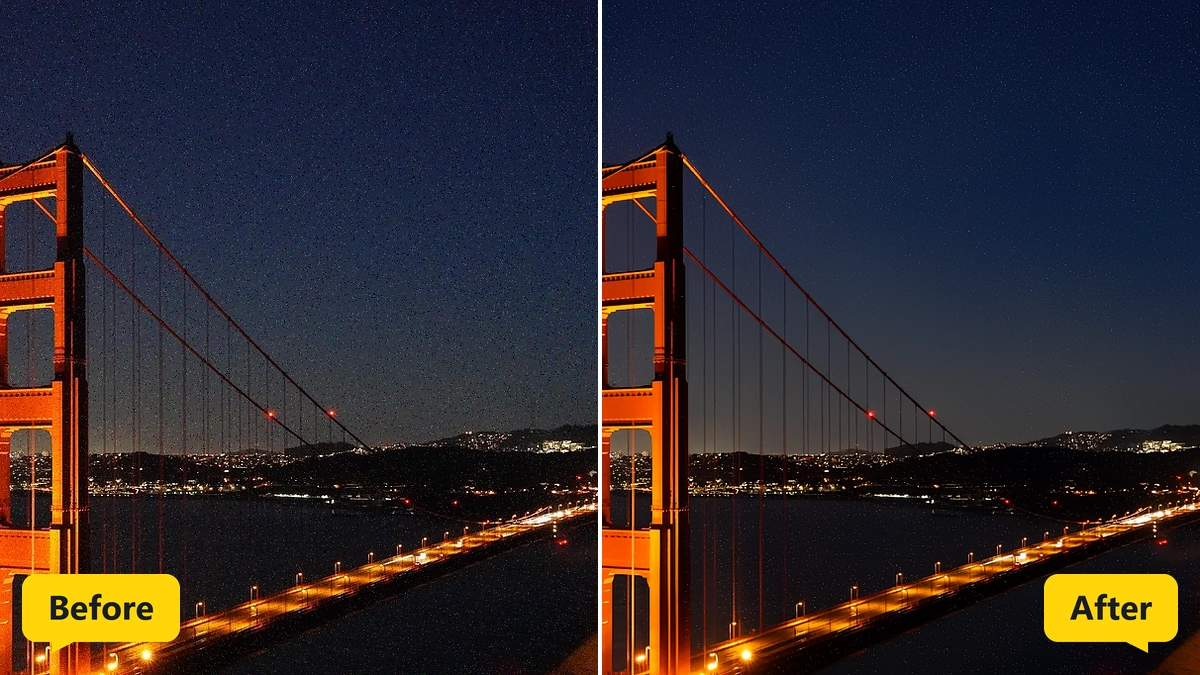
Grain and color noise disappear from a whole list of photos in one run.
MKGpics AI BATCH PHOTO DENOISER runs as an AI program on the PC. Noisy photos are added to a list, a strength profile and an output format are chosen, and one click on Start batch cleans every image. The program works without cloud and without subscription.

Batch Image Noise Reduction AI means that night shots, high ISO pictures and dark indoor photos get smooth surfaces without manual retouching. The batch AI photo denoiser works through the list and saves every cleaned photo.

Functions of Batch Image Noise Reduction AI
- Add Images button with a prompt for the surrounding folder
- Six input formats from PNG to TIFF
- File list that shows each photo path
- Live count of queued photos
- Clear list button for a fresh start
- Preview rows with the original next to the cleaned result
- Three strength profiles named Gentle, Medium and Full strength
- Adjustable strength for a custom balance between smoothness and texture
- Output as PNG or as JPG
- Choice of the output folder
- Source folder blocked as a save target
- Start batch and Cancel buttons
- Overall progress bar with a counter of finished photos
- Second progress bar that follows the current photo
- Large photos handled in overlapping sections
- Final report with saved photos and failed files
- File names with the suffix _denoised
- Help and interface in five languages
- Python AI libraries on the local PC remove the noise
Batch AI Photo Denoiser from Load to Save
The Add images button opens a file dialog. After one photo is picked, a prompt asks whether its whole folder should join the queue, so an entire shoot arrives with one confirmation. The batch AI photo denoiser processes exactly this queue.
Then the strength profile, the format PNG or JPG and a save folder get chosen. The source folder is blocked as a target, so no original is ever replaced.
» Free download and denoising of whole photo folders
The batch AI photo denoiser run begins with Start batch. One bar follows the whole queue, a second bar follows the photo in progress, and every finished photo lands in a preview row with the original on the left and the cleaned version on the right.
Stopping with Cancel keeps everything finished before.
Each result keeps its source name plus _denoised. The closing report names saved photos and failed files, and Clear list readies the next series.
Who Needs Batch Image Noise Reduction AI Runs
Event shooters, astro hobbyists and agencies face the same task: many images with the same noise. The batch AI photo denoiser turns that task into a single run.
- Beginners who want clean photos without learning an editor
- Hobby photographers with night and indoor shots
- Event and wedding photographers with long series
- Professionals who deliver cleaned images to clients
- Designers who need smooth source material for layouts
- Archivists who rescue scanned or high ISO collections
Strength Profiles and Photo Progress Explained
Three profiles are available: Gentle, Medium and Full strength. The profile sets the strength, and the strength stays adjustable afterwards for a custom balance.
Gentle mixes more of the original into the result and keeps skin and fabric texture. Full strength removes noise most thoroughly and fits dark night photos with heavy grain.
The best profile depends on the photo. Fine detail such as hair, feathers or stone surfaces keeps more character at Medium, while flat surfaces such as sky or walls do well with Full strength.
Large photos are cleaned in overlapping sections, and the photo progress bar shows the current photo as a count such as photo 3 of 25.
Jobs for Batch AI Photo Denoiser Runs from Concerts to Archives
Concerts, weddings, night cityscapes and astro photos need high sensitivity and show grain. The batch AI photo denoiser cleans the whole series after the event.
» Batch Image Noise Reduction AI free download
Old scans, smartphone photos in low light and drone shots at dusk carry the same grain and need the same cleanup.
Product photos taken in a small studio get clean backgrounds, which helps later steps such as cutting out or enlarging. Batch Image Noise Reduction AI belongs at the start of such a pipeline.
Questions and Answers about Batch Denoising
How do I remove noise from many photos at once?
Add the photos or a whole folder, choose a strength profile, an output format and an output folder, then click Start batch. The AI cleans every image in the list.
Do the original photos stay unchanged?
Yes, results are saved as new files with the suffix _denoised, and the folder of the originals is refused as the output folder.
Which strength profile should I pick?
Gentle keeps more texture, Medium balances noise and detail, and Full strength removes noise most thoroughly. The strength stays adjustable afterwards.
Does denoising remove fine detail?
Noise and detail are close neighbors, so heavy settings smooth some texture. Gentle and Medium keep more of it, and the preview rows show the effect.
What image types work for noise removal?
The input list takes PNG, JPG, JPEG, WebP, BMP and TIFF, while the cleaned copies come out as PNG or JPG.
Does the noise reduction work offline?
Yes, all cleaning takes place on the local PC without any internet connection.
|



