WordPress AI Post Generator and Checking AI Texts Before They Go Live
The WordPress AI post generator produces drafts quickly, but a draft is not yet a post. The software discussed here covers the part that comes after generation: it stores finished texts, lets you page through them in a preview and publishes them to your blog at the times you set. It does not write anything itself, and that is the point. By separating the writing from the posting, it gives you a clear spot at which to review what the generator delivered before anything goes public.

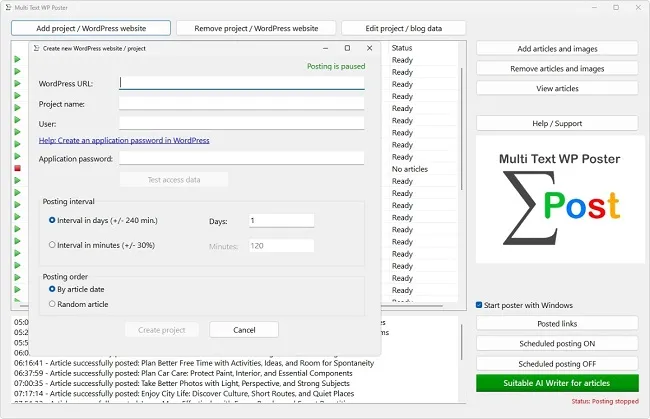
This WordPress AI post generator writes fast, but not reliably. It phrases things fluently even when the content is wrong, and it delivers text in a volume hardly anyone reads in full. Combine the WordPress AI post generator with an automaton that publishes the posts later without asking, and a risk appears: errors go online unnoticed, and in series. The check therefore has to happen before the text lands in the folder. This article describes a practical way to check the output of the WordPress AI post generator that stays sustainable even with larger quantities.
Why the Check Must Happen before the Folder
With manual publishing there is a natural checkpoint: you sit in front of the backend, see the post once more and only then click "Publish". With an automaton that moment is missing. What lies in the project folder is published at the set date without further questions. Between the decision to file the text and its appearance lie days or weeks, depending on the rhythm, and during that time nobody looks at it any more.
The folder is therefore the last lock for everything this WordPress AI post generator produces. Everything that the WordPress AI post generator delivers into it should be good enough that you would publish it even if you only saw it again in three months. This rule of thumb sounds strict but helps in borderline cases. A text you waver over does not belong in the stock but in revision.
There is another reason for checking the output of the WordPress AI post generator early: errors are cheapest to fix in the stock. A wrong sentence in a file is corrected in seconds. Once it is on the site, you need an update, possibly clearing the cache and an explanation to readers. On client sites there is also the trust you lose with every mistake. Anyone who checks the output of this WordPress AI post generator early saves time and nerves in the end.
Using the Preview in the Program
For reviewing what the WordPress AI post generator produced, there is the "View articles" button in the main window. It opens a preview of the texts in the selected project. At the top, a line shows which article you are currently looking at, for example "3 / 40", together with the file name. With "Previous article" and "Next article" you page through the entire stock without opening files one by one.
The preview of what the WordPress AI post generator wrote shows title and body as they stand in the file. It is, however, a plain view and does not use your site's design. How the post will look in the theme later, you therefore do not see there. For checking content, structure and headings it is entirely sufficient, for judging the layout it is not. For that it is advisable to look at the very first post of a project on the site once it has been published.
Texts cannot be edited in the preview. If you notice a mistake, open the file in a text editor, correct it and leave it in the folder. If a text cannot be saved, remove it via "Remove articles and images". There you see title, category and assigned images per article and can delete individual posts selectively. While these dialogs are open, posting is paused, so you can tidy up in peace.
The Fact Check and Where AI Texts Most Often Go Wrong
Language models behind the WordPress AI post generator do not calculate; they predict the most probable next word. That explains why they are so often wrong in certain places. Numbers and percentages are a classic: they sound plausible but often come from no source. Equally common are invented studies, quotes and people who never existed. Legal references with section numbers, prices, deadlines and version numbers also belong on the list of suspects.
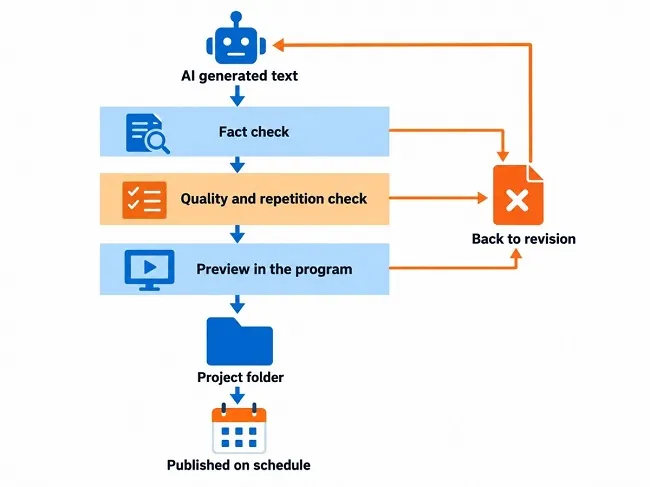
Check every concrete statement from this WordPress AI post generator that can be looked up against a primary source: the text of the law, the manufacturer's page, the authority or the statistics office. Delete statements without a verifiable basis or word them more cautiously. A sentence like "According to a recent study, costs rise by 37 percent" is worthless as long as you have not found the study.
Topics with an expiry date are especially delicate for the WordPress AI post generator. A model knows only the state of knowledge from its training, and that can be months or years old. Prices, laws, software versions and rankings should therefore never be taken over unchecked. If you produce many articles in stock, avoid statements with an expiry date altogether, or note the creation date in your filing so that after six months you know which texts need a second look.
Quality Criteria beyond the Facts
A text from the WordPress AI post generator can be correct and still weak. While reading a text from this WordPress AI post generator, ask whether it really helps a reader who has the question the title promises. Good articles answer it early, then go into depth and provide examples, figures or steps that can be applied immediately. Weak articles circle the topic, repeat themselves and end with a summary that says nothing new.
Also watch for repetition, both within one text and across several texts. The WordPress AI post generator tends to use the same phrasings and the same structure again and again. If your WordPress AI post generator produces twenty articles on the same topic, you quickly get almost the same text twenty times. For readers this is tiring, and for your own site it is a problem because posts compete with each other.
On style: read the beginning of the WordPress AI post generator text aloud. If it sounds like a cliché, like advertising or like an encyclopedia, revise it. Typical warning signs are introductions that only announce the topic instead of treating it, inflated adjectives and sentences that hide behind general statements. A text that says nothing concrete in its first paragraph will deliver little further down either.
What Google Says about AI Content
Search engines do not ban texts from the WordPress AI post generator. In its guidance for site owners (page dated 10 December 2025), Google makes clear that generative AI is permitted as long as the content complies with its policies. It becomes critical where AI is used to produce many pages without added value for users. That can violate the spam policy on "scaled content abuse", that is, content produced in bulk without benefit.
The yardstick is therefore not the WordPress AI post generator but the benefit. Google explicitly advises paying attention to accuracy, quality and relevance for automatically generated content. That also applies to accompanying details such as meta descriptions and image descriptions. Google also considers it helpful to tell readers how a piece of content was created, because that provides context.
For your practice this means: a single carefully checked article from this WordPress AI post generator is unproblematic. A hundred quickly generated, barely checked posts on interchangeable topics are not. Rather keep the stock smaller and in good order. Whether your site shows up in the results depends far more on such quality features than on the origin of the text.
Labelling and What Follows from the EU AI Act
The transparency obligations under Article 50 of the European AI Act were scheduled to start on 2 August 2026, and according to a law firm's analysis of the Digital Omnibus agreement that date was not changed. Only a grace period until 2 December 2026 for machine-readable marking of systems already on the market was added. According to a legal analysis from May 2026, operators must label AI-generated texts if they are published to inform the public and concern matters of public interest, such as politics, health, business, education or science. The obligation lapses, according to that analysis, if the text has been reviewed by a human or editorially controlled before publication and a clearly identifiable person or company bears editorial responsibility. A mere spell check is not enough for that.
Two reservations belong here. First, this is not legal advice, and whether a particular blog text falls under the rule depends on the individual case. Second, the Omnibus package had to be formally adopted, and details may have moved since; check the current state with a reliable source or get advice if your topics are of public interest.
The good news: what you should do anyway largely coincides with what the rule presupposes. Anyone who checks texts for content, takes responsibility for them as publisher and makes that visible in the site notice is on the safe side of good practice. A short note on the site that texts are created with AI support and reviewed editorially does no harm in any case.
A Review Workflow for Texts from the WordPress AI Post Generator
So that checking the WordPress AI post generator does not become a hurdle even with many texts, a fixed procedure helps. For a text of around 1,200 words it takes roughly ten to fifteen minutes, depending on how many statements need to be verified.
- First skim the title and outline. Does the headline fit the content, and does the first paragraph answer the question?
- Mark all numbers, names, deadlines and sources and verify each against a primary source.
- Delete repetitions, filler sentences and announcements that say nothing.
- Read the text aloud. Rewrite whatever sounds clumsy.
- Open the article in the preview and check headings, lists and tables.
- Note the review date in your filing and only then place the file in the project folder.
With a little practice, checking the texts of this WordPress AI post generator becomes routine, and the time needed drops noticeably. The payoff shows later: your site publishes only texts you stand behind, and you never have to retract anything afterwards.
|



